Nike’s usability failure on the Apple Watch exposes what smartwatches could be

One of the chief reasons I bought an Apple Watch was for Nike Run Club (what used to be called Nike+).[1] But the Nike software’s bugginess and some missed design elements has made Nike Run Club one of the most frustrating pieces of my watch. If Apple Watch is to be the forefront of smartwatches, then they need to whip companies like Nike to make full use of the interaction potential of wrist-based interactive surfaces.

Read on for more.

Surfaces
I got my first smartwatch in 2005. At that time, smartphones were establishing themselves as the convergence point for web, information, media, and social interaction. As I used that smartwatch (also purchased for running), I saw the way a second surface could enhance my phone, provide me with glanceable and immediate information, and allow me to extend my interaction with my phone, which might be in my pocket or in my armband.

Apple Watch as a slave 
Most of the apps on the Apple Watch only use the phone for connectivity. For the most part, they don’t share information back with the phone. They are not an extension of the phone, but a replication. There are apps that do have an awareness of what I have on my phone, though it’s more of a phone to watch sharing rather than a two-way collaboration – the watch is slave to the phone.

For example, if I set an alarm on my watch, it doesn’t show up in the alarm list on my phone. Oddly, if I set an alarm on my phone, it does ring and can be silenced from the watch. And I can control my phone-based music and podcasts from my phone, but I need to start them on my phone.

By the way, I don’t count things like email, texts, reminders, and calendars as being shared between phone and watch. Those things have established synchronizations across all related devices, so I don’t count the use of those on the watch as having anything to do with the phone (though, more on this below).

Nike minus 
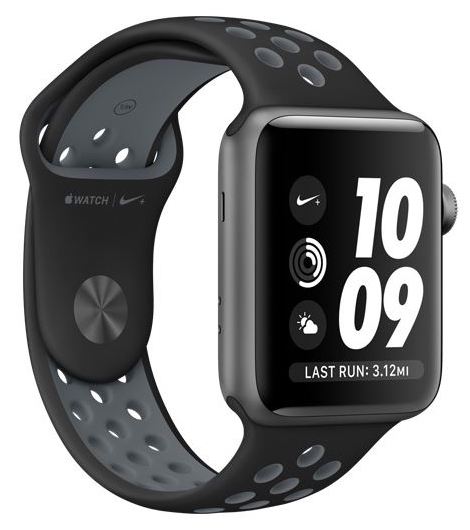
Based on my previous experience with running watches and my long time use of Nike+, I had high expectation for Apple’s Nike+ Apple Watch. When it works, it mostly delivers what I want – a glanceable read-out of my run on my wrist, and the ability to pause or end a run without pulling my phone out of the armband.

But the app misses a few key usability features. For starters, the app is flaky, half the time it won’t start on the watch or doesn’t know I started a run on the phone. This is the app itself – in my 10+ years using Nike+, the app always seemed to be designed by marketers, not true product developers. No other app on the phone seems to miss a trick when controlling my phone (albeit, I’ve only seen Apple apps do the remote control).

The app on the watch does know (when it works) that I’ve started a run on my phone and provides running data and the ability to pause and stop the run. But what irks me is that if you start the run on your watch, it does NOT turn on the app on the phone. The phone app does know if you’ve started a run on the watch, because a few times when there were issues, the phone app told me that the watch was also recording a run.[2]

What?

Apple Watch as surface 
What I have always expected from a wrist-based surface is that it be an extension of my phone. I should be able to initiate things on the watch that are reflected on the phone. And vice versa.

For example, if I start a run on my watch, then Nike Run Club on the phone should start and I should have the same experience as if I had initiated the run on my phone.

Also, if I have an app on the phone and on the watch, there should be some way to effect a handoff so I can start one place and continue elsewhere. For example, if I check a calendar entry on the watch, I can then go straight to the entry on my phone for more detail or interaction.

Why does this matter? Divergence.
Gartner, on the eve of the Mobile World Congress, reported the first ever decline in global smartphone shipments. They attribute this, though, to lack of low-cost options, folks holding on to their existing phones longer, and longer upgrade cycles.

But let me suggest this: might it be due to the increasing number of surfaces we now interact with?

The growth of smartphones was characterized by the increasing convergence of computation, data, media, social connections, and attention in smartphones. But in the past years, we’ve slowly diverged, especially with home hubs for music and information, smart devices being spread across the home, smart cars, and, of course, the proliferation of wearables, particularly smartwatches.

We are finally entering into a real ubiquitous computing era, and this is wearing down the smartphone’s central role. As we accumulate a cluster of devices we interact with or own, we need to update our current model of interaction, where everything is a slave to the phone. We need a model where all the devices are aware of each other and share the load; where what we do is handed off between devices as we move to the more appropriate surface or interaction interface. So long as all our devices are slaves to the smartphone, our user experience will be tethered to the phone.

Tellingly, the onboarding process for the Apple Watch basically can be summarized as “Do as I do on my phone.” Can we go beyond that?

Glimpse of how it can be 
In many ways, Apple has made us less focused on the primacy of the smartphones. Apple implemented Handoff between iPhone and Mac, so you can start actions one place and complete elsewhere. iCloud keeps our media, messages, and content synchronized for every device we use, so getting a new device just means signing into your account. (OK, so I’m a bit of an Apple-head)

This divergence beyond the smartphone will force developers to be cleverer as to how we make use of the seams between devices, be more cognizant of the benefits of different surfaces of interaction, and strive for a higher bar of usability across multiple usability challenges and environments.

Exciting, no?

What do you think?

[1] The other chief reason was that I needed a more secure and private notification method.
[2] I can’t stand error messages that know what’s wrong but make me do the corrective action, rather than fixing it themselves.
Public/private messaging and Twitter’s stalled growth

The news today that Twitter didn’t grow in the past quarter had me scratching my head.
Twitter did not add any new monthly active users in the past three months, but said 12 percent more users are accessing the site on a daily basis than in the same quarter last year.

Source: Twitter stalls, fails to add new users this quarter – The Verge

Twitter is central to how elected officials, business leaders, celebrities, and corporations release micro-press releases and statements. Folks hang on every tweet. It’s been near impossible to find a polemic news article that doesn’t come with a few quotes from Twitter.

Though might this be the reason Twitter’s growth has stalled? Twitter, as I recall the early days, was about personal updates (don’t scoff) and observations. Alas, the ambient community awareness has been replaced by dry information and one-way statements.

People forget how folks left MySpace and YahooGroups en masse back in the day to places like Facebook and Twitter. Folks followed their friends to continue the conversation. The kids these days are not on Twitter, but on places like Instagram, SnapChat, and WhatsApp. That’s where their friends are and that’s where they share personal updates (makes sense, which is why you don’t scoff) and observations.

There is a limit to how may folks want to use the Twitter megaphone. And perhaps Twitter has acquired as many people or bots as they will acquire. With the original heart long dead and cold, Twitter isn’t really that interesting a place to hang out with friends.

What do you think?

Image from The Verge

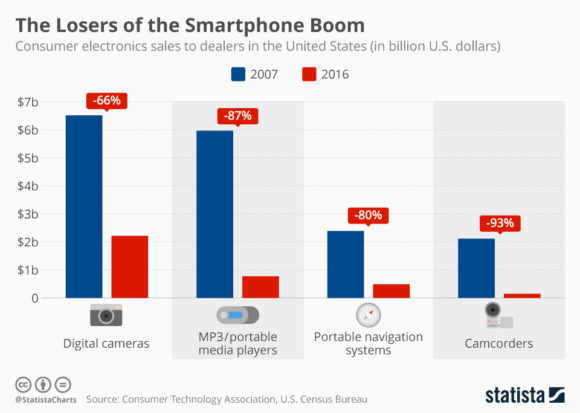
Might the losers of the smartphone boom suggest the losers of the wrist-top wars with smartwatches?

I recently saw (via CBInsights) this graphic of the impact smartphones had on the sales in different consumer electronic categories. Back in Nokia’s heyday, we were well aware of the mobile phone obliterating so many consumer goods categories around time, organization, and communication, such as watches, cameras, calendars and planners, address books, and telephone booths.* And we realized the convergence of so many other things through the phone, such as payments, messaging, and purchasing and ordering, would have ripple effects on transaction brokers, as well.

So this new graphic was not news to me.

Wrist-top wars
But, since I have smartwatches on the mind,  the graphic triggered a similar thought about how the smartwatch is making it difficult for manufacturers of things that sit on the wrist, such as fitness bands, health monitors, ID bracelets, jewelry, and analog watches.

Jawbone, a headset, then speaker, company that killed itself in the wrist-top space, is gone. FitBit, a brand universally connected to wrist-top fitness bands, might be next, despite buying and assimilating, Pebble, a smartwatch pioneer. And let’s not list here the numerous other companies making wrist-top devices for activity tacking, elderly tracking, or health measurements.

And the same goes for those who are edging to the smartwatch space, such as the fledgling iBeat. Can they be smartwatch enough to muscle aside Apple, Android Wear, or Nokia?

How do you think this wrist-top was will play out?

Image from Statista

* I recall mentioning back then that Nokia was the largest manufacturer of cameras, calendars, and clocks, to name a few.

Cars, phones, watches: Silly about our electrical anxiety

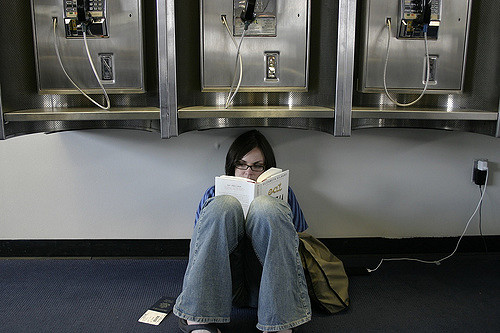
We’ve all seen the image of the folks sitting on the floor at the airport charging their devices. Yes, that’s where we are at: hyper-aware of every plug in case we run down the charge on some electronic gizmo we are carrying, especially our phones.

Batteries everywhere
I’d like to point out that our electrical anxiety will only get worse: in addition to our phones, we now gripe about the battery life of our cars and watches.

Though I’d like to point out that this is all silly.

Phones: back in the day, phones would last days with a charge. Now that we live in an always-connected, smartphone-guided world, we seem to be fine that we need to top off our phones every night, if not also in the afternoon before when we head out for evening activities.[1]

Watches: Millennials might be surprised to hear that analog watches usually need to be recharged every day. They get recharged by winding of some sort, either manually or with an internal weight that automatically winds the watch. The funny thing is that the automatic winder is sort of a nudge to keep active. If you don’t move enough, the watch ends up dying.[2]

Cars: I drive a car that has to be recharged every few hundred miles. With gas, though. OK, so the phone and watch folks worrying about charging are a bit silly. Cars still have the issue of low numbers of charging stations and charging speed, so perhaps that anxiety is well-founded. But electric car manufacturers repeatedly state that, due to typical driving habits, most folks will be near a charger most times. Nonetheless, there is still some behavior modification required.[3]

Electric anxiety
Behavior modification is fine, so long as it isn’t onerous. And business should be more astute to the underlying electrical needs of the modern human. For example, why do most hotels and airports hide all their electrical outlets?

Also, we need to realize that our anxieties about electrical longevity are a bit silly, since we already have habits that require daily tending of our non-electrical gadgets. The problem is trying to compare the electrical to the non-electrical.

Finally, and more interesting to me, we need to be smart designing how long things last on battery. Particularly, a daily need to charge a watch will likely work better than a cadence that doesn’t match our charging habits, or charging ease. Hence, I wonder if there will be more complaints with batteries that need to be charged at an interval that isn’t daily or weekly, or one that is longer than 10 days. That cadence won’t be in line with other things we anxiously keep charged.

Don’t you think? How many gadgets do you have to keep charged these days?

[1] I always carry a battery pack. But then, I always carried an extra phone battery back in the day.

[2]  Here’s a smartwatch with analog self-charging. Let’s see if it works. But clever idea, and the article that triggered this post.

[3]  Seems like these cross-country drivers solved their charger-access issue.

Image: Shane Adams

Foreground:Background. Can watches save us from our phone attention deficit disorder?

I mentioned briefly in a previous post how the mobile phone has become a foreground object. By that I mean an object that requires two hands, full attention, lean forward, foreground activity.

Back in the day, the mobile was a one-handed, back pocket, interrupting, background device. But then we got better platforms, stronger computing, bigger bandwidth, and more things to focus out attention on (indeed, phone makers are piling on the features complicating matters further).

Mark Manson has a nice rant about how everyone always has to be checking their phones (“the new cigarette”). And the Verge wrote a nice article on how we are trying to reclaim the space our phones are taking over.

Watch me complicate things
In that same previous post of mine I was touting the watch as the new glanceable background surface. But are we replacing one addiction (the phone) with another (a watch)?

I am cognizant of two things when I have my watch one. One, while a vibration on my wrist is a notification of some sort that I know is requesting my attention, I focus my attention on the need of the moment: a person, a call, a movie, work (not much different than I am with my phone).

The other is a bit more subtle. I am aware that glancing at the wrist is signal for impatience or hoping time moves faster. Now that we’re mixing this up by having folks look at their wrists for notifications, we might be sending the wrong message. All the more reason to not glance at your watch while talking to someone.

Unintended consequences
Though can folks be any less tied to their devices if something is poking them on the wrist for attention? While I keep thinking of the watch as the new background, we might still not be able to unclench our paws from our phones. The watch will only serve to provide us yet another surface to sap our attention.

Are you more hopeful than I am? Do you think a new gadget with a new form factor and interaction metaphor help cure us of our phone attention deficit?

Smartwatches: definitions, lifestyle, what works, and haptic afterimages

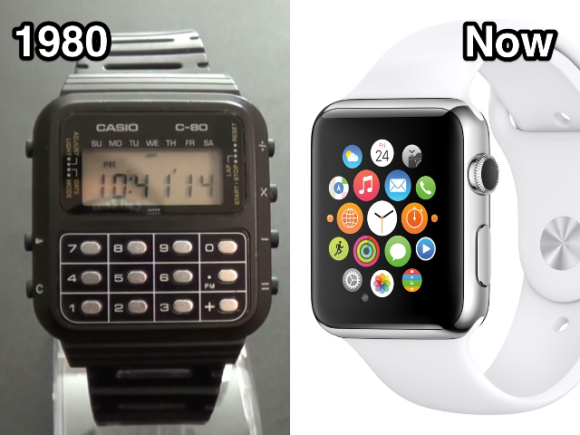
Despite what many write, smartwatches have been around for a long time. I know this because I got my first smartwatch back in 2005 (or was it even earlier when I had a Casio C-80 calculator watch?).*

Nonetheless, The Verge’s article on defining smartwatches stands as a good reality-check for all the hype surrounding smartwatches. The article muses on aspects of connectivity, notifications, and apps, sort of orbiting a definition but realizing the difficulty in settling on one.

I had my own ideas as to what smartwatches were and were not. The Verge article, and a review by the inestimable DC Rainmaker, were the nudges I needed to get my own model smartwatch (Apple Series 2, Nike+ Edition, in case you’re wondering). As I mentioned before, the only real way of understanding smartwatches was direct user experience.

Not a review
I don’t want to review the watch here. Though I have not seen a review mentioning the clever First Use experience and smart symbiosis with the phone (mostly because all the reviews focus on the features and not the user experience).

And I might not be the novice user: I’ve had a smarter-than-the-average-bear watch for some time; I had a need for a new notification method[2]; and I had a targeted use case as a long-time Nike+ user.

Mobile Lifestyle now Watch Lifestyle
In the Verge article, notifications and apps were the top two smartwatch definitions users had voted for. And after using my new watch for a few months, notifications and a small selection of apps (original and uploaded) have been crucial to my use. Indeed, what makes the notifications and the apps work, is that the only ones I use on the watch are well-suited to the “watch lifestyle.”

Back in the day, when smartphones were beginning to take hold, and folks were starting to post photos and messages online from their phones, I had developed a model to describe the Mobile Lifestyle. The true qualities of mobiles (back then) were back pocket, one-handed, interruptive, glanceable, snippets, background activities. The desktop experience was two-handed, lean-forward, immersive, fire-hose, foreground activities.

But a funny thing has happened in the ensuing 10 years, the mobile has become a foreground object – it’s the main focus of two-handed, immersive, attention that a desktop computer was requiring back in the day (proof in this image).

The new glanceable surface
The smartwatch now has a role to play as a new glanceable surface, much like mobiles were long ago. The features that made smartwatches so useful long ago, such as surface glanceability, connectivity, sensor integration, still hold for today. Even more so now that we are usually nose-down on our phones.

And I’m not the only one realizing this. Various large companies are turning to watches as a way to surface important snippets of information or notifications. My favorite are restaurants and janitorial services using notification and interactions to manage the flow of on-demand services. Though, the “haptic afterimage” might be too much for some. 🙂

The problem with notifications is that you then get overwhelmed with notifications, shifting a problem on the phone to your wrist. The way I countered that was to further curate the categories of notification on my wrist. And I turned off all tones – I’ve gone pure haptic vibration for all my notifications.

Interestingly, the role of the watch to integrate notifications and data on a small glanceable surface is an opening for AI to make things better. Indeed, rumor has it that Siri will organize things better in the next watch OS.

And what about apps?
Much like the early days of apps on smartphones, watches will also benefit from focused point apps.[3] For example, using ApplePay with my watch was tremendously easier than using my phone. Indeed, the process was so fast and simple that, during my recent trip to Finland, merchants’ jaws dropped as I touched my watch to the sales terminals.

It’s not a crime to be a good watch with simple and direct features rather than some funky multi-app OS or some super-duper fitness gizmo with a watch as a second thought. Watches will succeed where they fit the watch lifestyle and interaction range.

What do you think?

[1] I am partial to the definition of connectivity, data, and surface glanceability as core features of a smartwatch. My Suunto T6, back in 2005, connected wirelessly to various sensors, provided a real-time readout to those sensors (notifications were related to the sensors), and connect to my computer via a data cable.
[2] I’m much more cognizant of the lockscreen on my phone. The watch, though, is set up to lock up when off my wrist, so it feels a lot more secure.
[3] I still think trying to shove full mobile phone features into a watch will hit the usability limits of the watch and just fail.

Image from Business Insider

Wrist wars determining fate of smartwatches and wearables

About two months ago I retired my Suunto T6 (left in image) and got an Apple Watch (right in image). The Suunto was top of the line wrist-top computer for 2006. Like other running watches, I used it to track heart rate (with belt), time runs and intervals, and measure speed (with foot pod). And like other sports watches, it was quite well-suited for what it was intended to do. This was indeed a smartwatch circa 2006.

One thing I knew, during all these 11 years I had the watch, was that it had a prized position on my wrist. And anything that wanted to displace it was fighting for that position.

Quick saturation of wrists
Most seem to talk about smartwatches as something that has infinite growth potential. In reality, smartwatches will likely be limited to one wrist per person (duh). Therefore, the activation energy to get one includes convincing someone that a new watch is enough to displace an old watch.

Now that I have an Apple Watch, it is highly unlikely that I will replace it with something for many years to come. The watch is stuck on my wrist.

And once I have the watch on, why would I also get a fitness band to jostle on my wrist? Because activity tracking is just another feature of the Apple Watch, once an Apple Watch gets on a wrist, whole swaths of fitness wearables become irrelevant.

Variety is the spice of wearables?
This occupation of the wrist also means other watches are excluded. Swatch historically has tried to counter this exclusion by making customizable watches and bringing the prices down so that it is easy to have multiple watches.

Also, in the mechanical watch world, it’s easy to have a day watch, a night watch, a swim watch, since things are simple, you won’t lose data, and the watch is basically like jewelry. But we haven’t hit that range or functionality with smartwatches to encourage owning multiple.

Smartwatch manufacturers will have the pride of place. And woe to any wearable manufacturer competing for that same wrist spot.

Running with jewelry
But it’s not that dire. Those who make wearables that do not go on the wrist, say rings or clips or pendants, have a better chance to compete for users without the problems of being excluded. Though they should approach their position as jewelry that is used briefly, swapped out with other jewelry, and needs to be designed well (especially user value).

Just stay off the wrist. 🙂

What do you think?

Fidgeting with phones

With all the craziness around fidget spinners, I just wanted to point out that back in the day, we used to talk about the ability to fondle Nokia phone. We felt that for hand-held objects, understanding how folks might hold, fondle, and fidget with them should be incorporated into the design.

Some phones had a specific spot on the back for you to place your index finger while holding the phone during a call. And Nokia spent a lot of time figuring out phone material textures.

Many phones had curves that the phone could pivot on, letting you spin it on a table. I was very much the type to idly spin my phone on tables. Alas, I could not spin it in my hand like this dude.

Also there were some phones that would dance or spin when vibrating.

Every iPhone I had I’ve tried to see if it could spin. Kinda sad to see the preponderance of flat black monoliths with a protruding camera at one corner killing the joy of fidgeting with my phone.

Did you have a favorite phone you fidgeted with?

ISAMI meetup April 26, 2017, Column Health Somerville

Hello folks,

Next ISAMI meetup is scheduled!

This month, Emily Lindmer and Vincent Valant, from Hey,Charlie will talk about their app, how they got to where they are, and where they are heading.

Hey,Charlie is a mobile app for opiate addicts who are in recovery or are seeking recovery. The core of the app help addicts manage the telephone numbers of people who are good or bad influences, providing awareness and encouragement of the right behaviors and relationships.

Come to the meetup to hear the whole story!

Date: Wednesday, April 26, 2017
Time: 6:30pm-8:30pm
Place:
Column Health Somerville
401 Highland Ave.
Somerville, MA 02144

Please spread the word. Our challenge to you: bring a buddy along.

Best regards,

Charlie

Follow us Twitter at @ISAMI_Boston
Join our LinkedIn group – “Innovative Solutions in Addiction and Mental Illness”

We should all rethink the level of access of our mobile devices

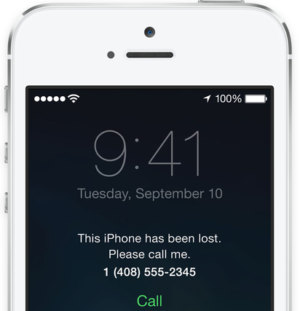
A recent second phone theft in the family prompted me to revisit the extent to which the iPhone is secure from unwanted access. The key security hole is the lock screen. The last major update to iOS created a radically new lock screen.

Addicted to the locked screen
I will admit that I am a heavy user of my phone when it is locked. I regularly ask Siri for things, check calendar and other items in the Today section, review notifications, read and reply to messages, and manage phone settings and music in the Control Center. Indeed, that’s almost everything that I know one can do while the phone is locked.

I recently upgraded to the new 7 and activated Apple Pay in my lock screen – a press of the home button and all the payment options pop up. A nice quick access.

But seeing how easily my cards popped up gave me the heebeegeebees, so I turned it off.

And then my daughter had her phone nicked out of her coat.

Going dark. Easily.
Apple has some good phone finding and locking capabilities. When I got the text from her that her phone had been stolen, I got onto Find Phone, tried to locate it, sent the Lock command and note. Only thing, the phone was dark.

OK, so, yes, the phone can be turned off without knowing the lock code. But a bit more troublesome, the phone can be taken offline by raising the Control Center and going into airplane mode. That means that the phone can be futzed with while it is offline. If the phone could not be placed offline, then at least the cellular data would allow some communication and location.

What else?
As I was texting with my daughter, I was concerned that the thieves would be able to see my messages. That’s when she told me that she turned off the message notification on the lock screen for her own privacy.

A quick look online showed that many folks realized that putting so many things on the lock screen has presented a privacy and security risk for users (this is a good article to read).

Ubiquitous computing headaches
I’ve been reading a lot about the proliferation of internet-connected devices (aka IoT, but I knew it back in the day as ubiquitous computing). One common alarm is the low-level security leaving the barn door wide open for hackers. Though often, folks compare washer machine and thermostat risks to the security of phones and computers.

Not so fast.

We need to assess the security of our phones and computers as well, in their mobile context. And users are not equipped to understand how to get to a secure state. Though, I am sure millennials, if you tell them to lock down the privacy of their phones and computers away from their nosy friends and family, can figure out all the ways to keep private.

More serious options
The ability to turn off the phone without a passcode is an achilles heel. The remote locking and wiping of the phone is good, but perhaps there needs to be something more when someone tries to either reuse parts (which I think is the usual fate of these locked phones) or connects to iTunes. Indeed, my wife wishes there was a halt and catch fire, yes, catch fire, to spite the thief. Perhaps we should think of the whole lost/theft experience: how can we counter the fishing attempts to get the iCloud info to unlock the phone, how do we make it easy for carriers and Apple to be aware of the theft, how do we make it easy to know the IMEI and other identifying info after theft?

An experiment
I have now turned off anything that might show up or use my lock screen. As a heavy user, I want to see the impact on my usage, figure out the balance between privacy/security and usefulness.

Also, I’ll let the rest of my family know about these privacy holes, including passwords on computers and phones.

Already I’m missing Siri: I was on a run and could not control the music player, or find out who was calling or messaging me.* And around the house, I can’t just holler to Siri for some info or what. I wonder if there’s a quick way to turn it on and off on the lock screen, but, it’s really not much of an assistant.

What about you?
Do you have a story of being lulled into a security breach while using the lock screen of your phone? What do you do to stay private?

*Hm, now that Apple Watch really seems useful as a second screen.

Image from ZDNet