I stumbled upon a brief rant on technology by Ursula LeGuin via The Prepared. Great stuff. Alas, I required a bit more than a tweet for me to riff off of it.
“Technology is the active human interface with the material world.” What I like about this rant is that it echoes my own view of what folks call ‘technology’. I often point out to tech-worshippers that a frakkin’ pencil is ‘technology.’ Indeed, you could write a while book on the pencil and cover so much about science and engineering and, yes, technology (well, I know I could (well, I did, sort of in a NaNoWriMo chapter)).
As LeGuin sorta says, it doesn’t have to be some LIDAR-carrying mobile phone with scratch-proof glass and precision machining and connects to dozen of satellites and can receive push messages from your Roomba when it rolls over your cat.
Clothing, dishes, toothpicks – they are all ‘technology’ – things we make to interact with our physical world.
Humans are inveterate technoweenies Usually the next thing I say after the pencil comment is, heck, even a chipped flint stone is technology. And humans have been making things (*cough* technology) for evah – IT DEFINES US. I have visions of cavehumans hanging around the fire in a deep discussion on the latest flint techniques and what Harg in the next village over did with that wicked deerhorn to chip the stone just right – just like we all hang around talking about hi-fi (d’oh, dating myself) mobile phones.
To hark back to LeGuin’s rant, it’s stupid to say her stories don’t have technology when technology is everywhere for any civilization (or even non-civilizations – go google about animal tool use).
Technology Finally, one related secret about my writing: I try not to use the word ‘technology’ at all (ok, so this post is messing up my score). This writing choice was inspired about 15 or more years ago by Ben Hammersly who was taking over some editorial duties at Wired and was going to ban ‘technology’ from everyone’s writing. Well, that’s how I remember it,* and how I was affected by it. And I’ve cut out a gazillion instances of the word ‘technology’ from my writing (and I’ve written a krapload in the past 15+ years).
Rant-triggered rant So, when I read LeGuin’s rant, I needed to riff off of hers and add mine – she’s so right, a damn pencil is technology; we have always been technoweenies; and don’t don’t don’t ever use THAT WORD again.
I feel better.
*One other item that stands out from that conversation with Ben: matte black magazine covers. I can’t unsee that. Thank you, Ben.
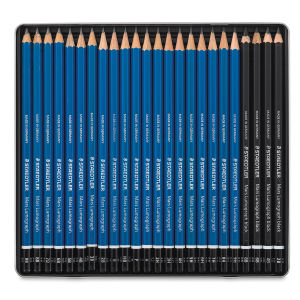
Image from Blick, purveyors of all sorts of fine pencils (and other stuff, too)
I’ve been posting these pauses for almost 17 years. They are meant to give folks a quick overview of where I am at, but when I look at them, they serve a good reminder of where I have been. And, wow, krazy how much change one can go through in 17 years.
Me Who am I? I’m Charlie Schick. I’m passionate about exploring how the intersection of bits and atoms help us tell stories of our physical-digital-sublime world. Indeed, one story I’ve lately been trying hard to explore is how we use physical constructs to connect to the sublime.
I also advise companies on product design, client engagement strategies, and new market opportunities. I’m a recovering PhD, too, and proudly ex-IBM, -Boston Children’s, -Nokia.
By day I just started (December 2021) a new role as VP of Marketing for Quartic.ai, helping the small startup grow into the leader in industrial AI we know we are. I am excited to be back into the world of AI and pharma and know that 2022 and beyond will be kick-ass.
By night A most amazing development in the past few years is my journey into embedded electronics, 3D printing, and making in general. I know I will be doing more in 2022 and that the modest superpowers I have gained in the past year will be dwarfed by the superpowers I expect to gain in the coming one. Oh, the places we’ll go.
Because I can’t stop For a very long time, I’ve been sharing my experience, insights, and exploits, especially through writing for and speaking to large audiences and engaging with others in stimulating conversations, including the office of CxOs. With my new role, I expect things kick up again in this space. Let me know how I can help in this capacity.
And of course, my standard disclaimer (my usual riff off of an ancient Cringely disclaimer) Everything I write here on this site is an expression of my own opinions, NOT of any of my clients or anyone I work for, especially Quartic. If these were the opinions of my clients or Quartic, the site would be under their name and, for sure, the writing and design would be much more professional. Likewise, I am an intensely trained professional writer 😛, so don’t expect to find any confidential secret corporate mumbo-jumbo being revealed here.
If you have ideas or projects that you think I might be interested in, please contact me, Charlie Schick, at firstname.lastname@molecularist.com or via my profile on LinkedIn.
Yes, you can find me on Twitter. I use it more to follow an amazing community of makers, to be marveled by their creativity, commentary, and caring; though, do say ‘hi’ if you swing by.
Image from a project of mine using a microcontroller to explore death and deathlessness
Many decades ago, my mother bought my father a Tissot Seastar Seven. A very simple watch, which also has its own pendulum to keep it wound as the wearer moves about. I used to use it a lot. And it had an activity tracker sort of vibe: if I spent most of the day sitting around, the watch would eventually stop.
Alas, the crown was damaged and I didn’t use it for many years. But after my father passed away, late last year, I thought I’d get it fixed, in his honor. I knew the watch would have to compete with my daily wearing of my Apple Watch, so I knew I’d want to get some sort of watch winder, so that it would keep time and be ready to wear when needed.
This wouldn’t be my first watch winder, nor the last. I had built a watch winder for my For All Time project. And my father left another, fancy, watch, also a self-winder, for my kids, so I felt that there would be yet another watch that would need a watch winder.
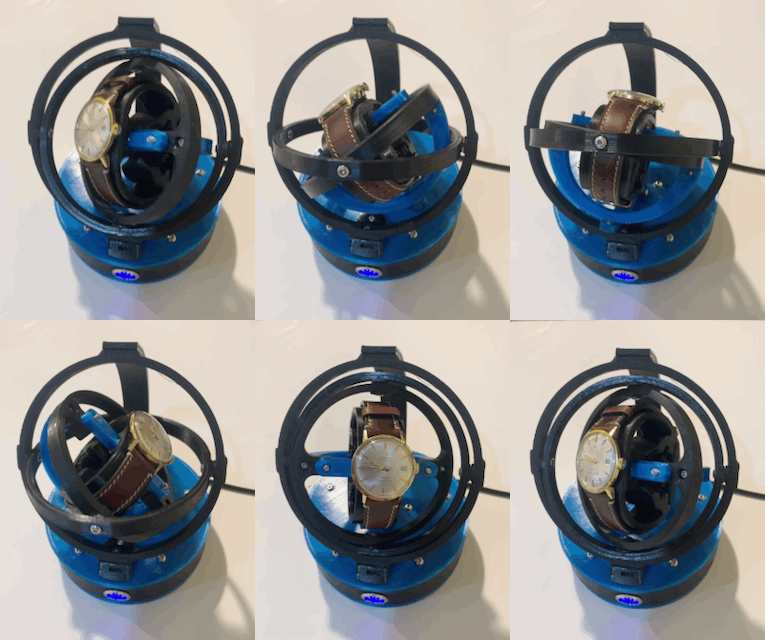
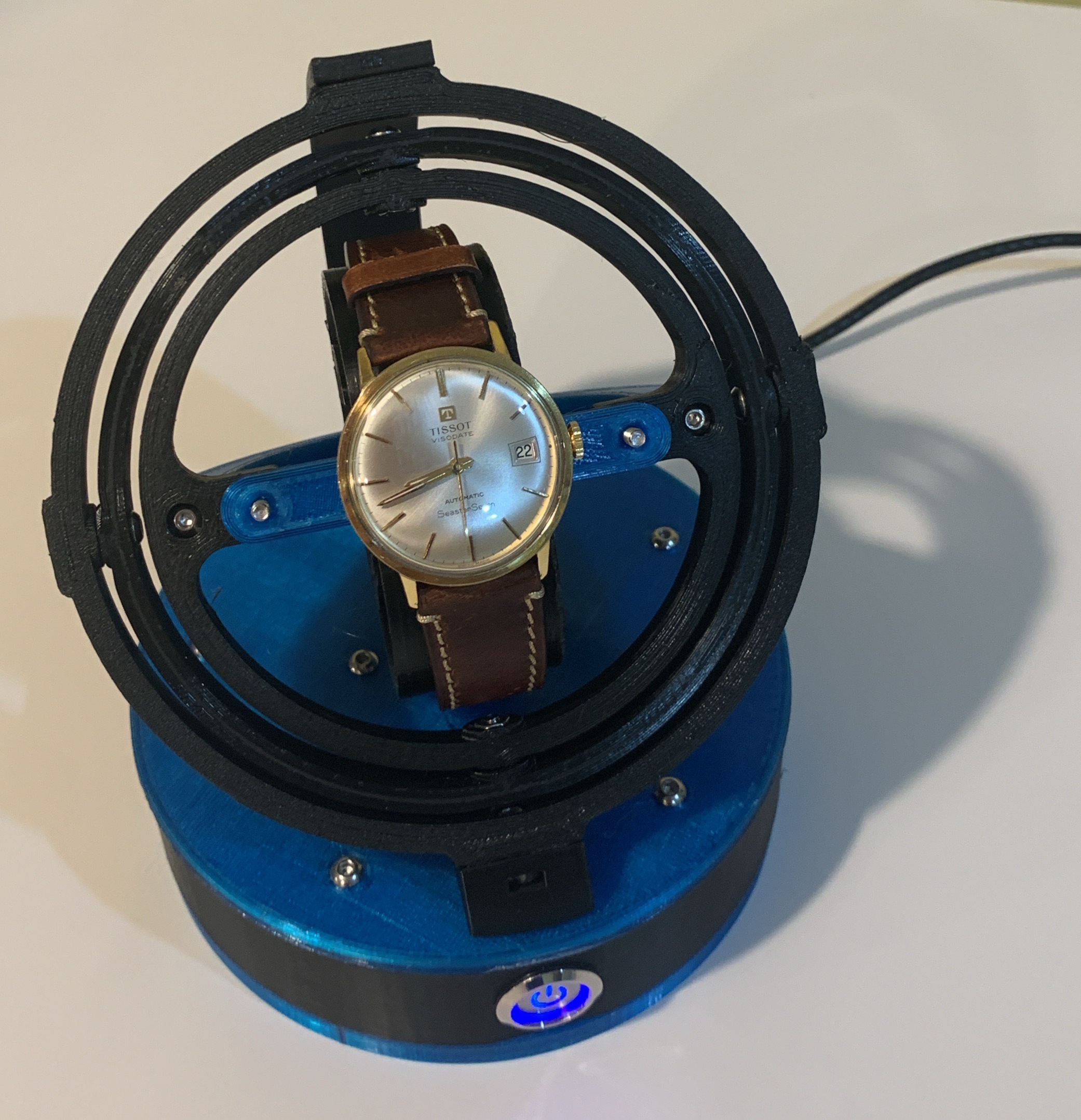
Spinning in a fancy way I didn’t want some boring spinner like I had to use in my For All Time project. I had seen some gyro watch winders that were really cool. After some research, I found this one by Bruno Esgulian. And I’d seen many versions to get some thoughts on the color pattern.
So I bought the model from Bruno and the parts on the list that I didn’t have and got printing the whole set up in black and transparent blue PETG.
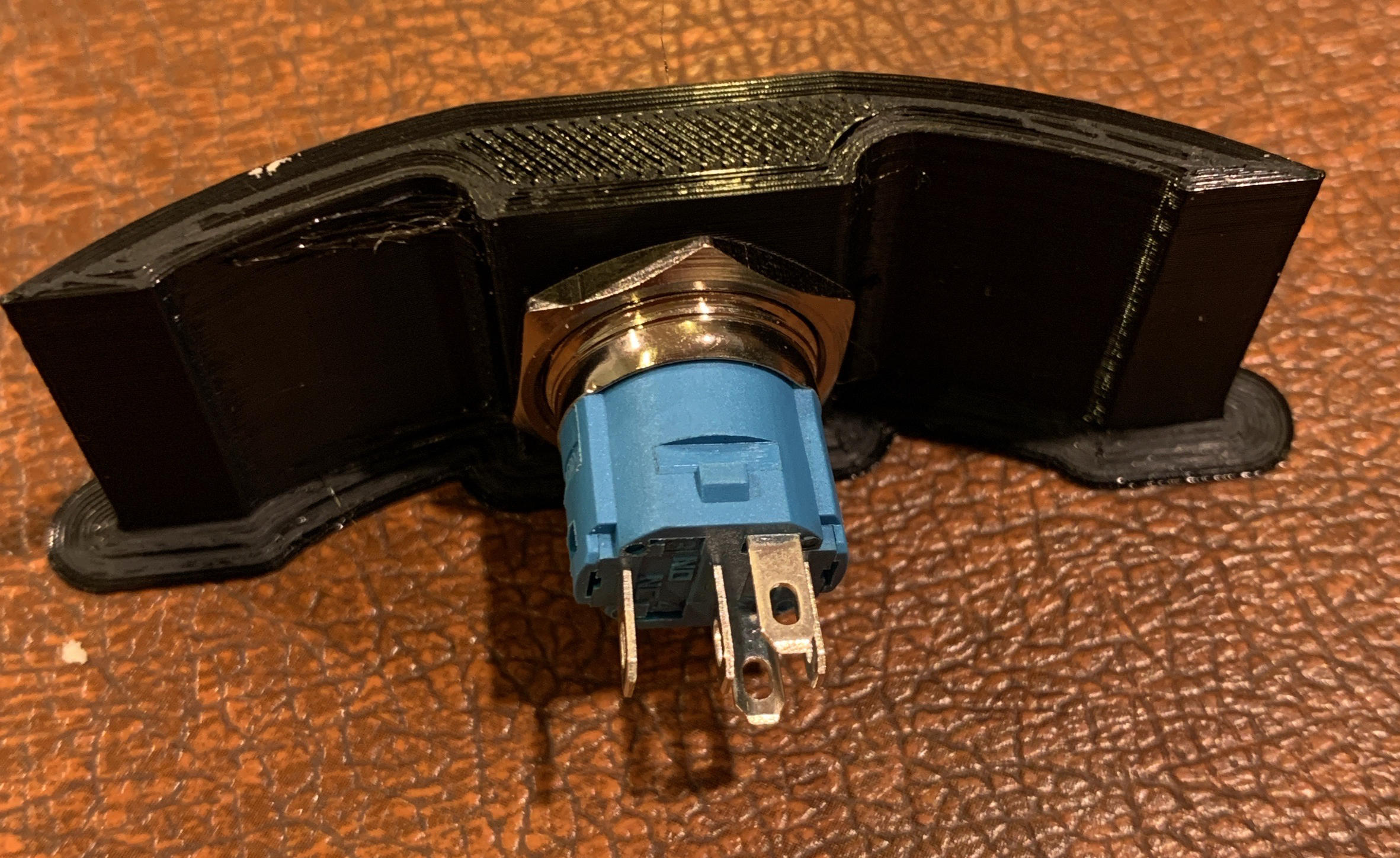
No so fast The buttons I got didn’t fit into the hole in the original model, leading to some funny attempts by me to fit it and ruining one of the two buttons that came (I had bought a 2-pack because I eventually was going to build a second winder, right?).
I had to modify the model to enlarge the hole a tad and print it again. And that worked.
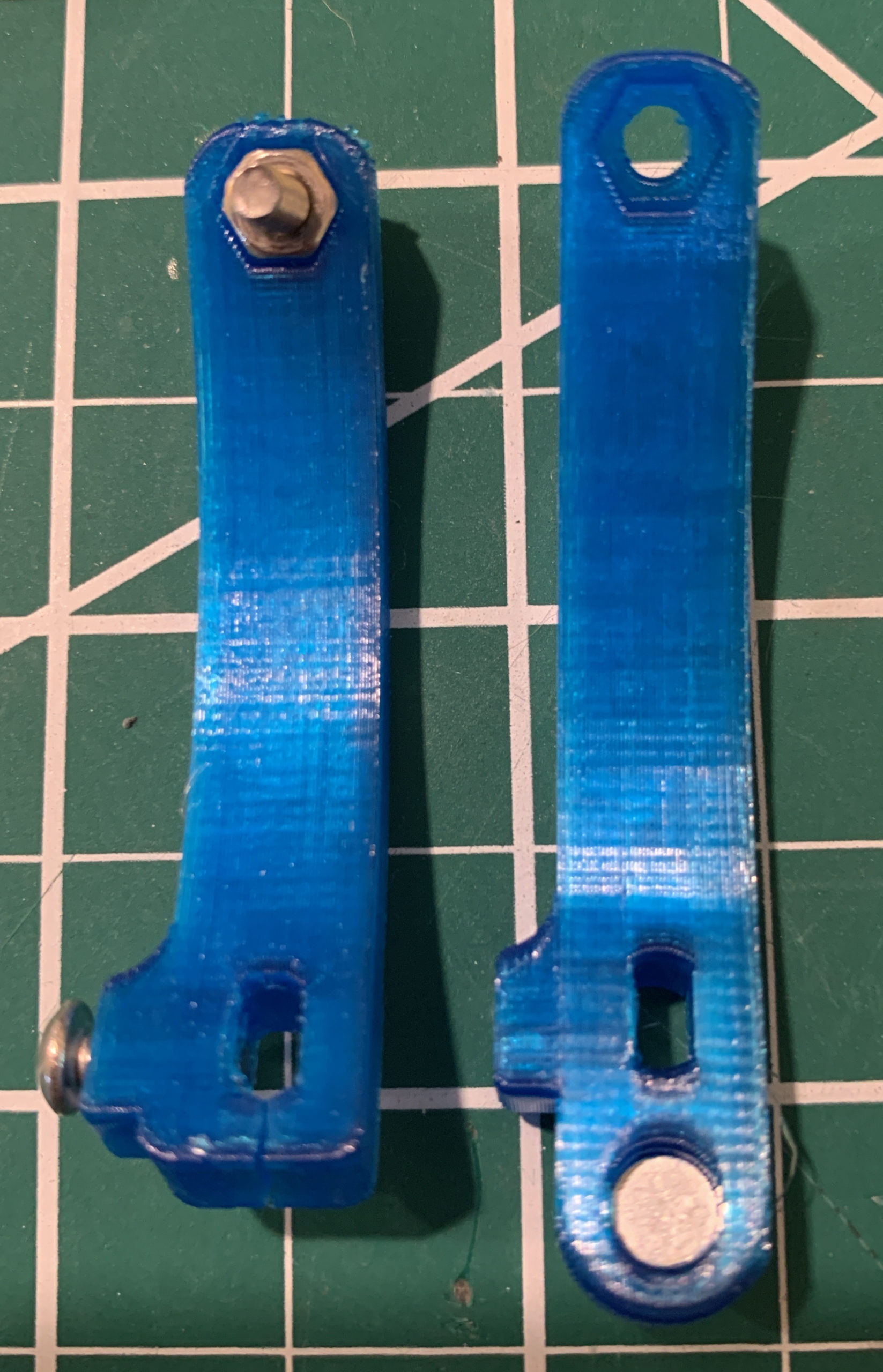
An aside: I don’t know about you, but I regularly do test prints of specific sections of my models so I don’t print a whole model and potentially waste time and materials. On the right, I printed just the section of the base that had the modified button hole.
The second modification was the code. I wasn’t too enthused with the code that the maker was offering, so I made my own from scratch (well, not from scratch, I was reusing some code from the For All Time project, so I knew what I wanted and what to do).
A third modification was the power cable. I wanted to be able to power it, switch it off from the button on front for when I’m using the watch, and still be able to program the winder in case I had to change a parameter.
For that, I did some careful surgery on a USB cable, breaking out the power to be controlled by the button and keeping the data wires intact. Worked really well.
Drifting One thing with winders is that you need to find the right amount of rotations so as to not overwind or underwind, which show up as the watch getting ahead or behind the time, respectively.
But as I was tweaking how many rotations per hour, I noticed that the stepper, not so accurate (there’s a reason the library is call “Cheap Stepper”), was slowly drifting out of true at the end of the rotations (that is, not returning to home, off by a bit each rotation).
Not aesthetically pleasing. So I needed to design a homing mechanism.
I made a modified spinning arm with a place for a magnet (image right), and used a reed switch to sense homing (and borrowed the homing code from my For All Time project). Worked like a charm, and the gyro is now always spot on.
With that, I was able to tweak the rotations, and now the watch is always wound and keeping time, ready for me to wear.
In the end, what I thought was going to be a straightforward build, turned out to require a bit of ingenuity and modification to get it to work just how I wanted.
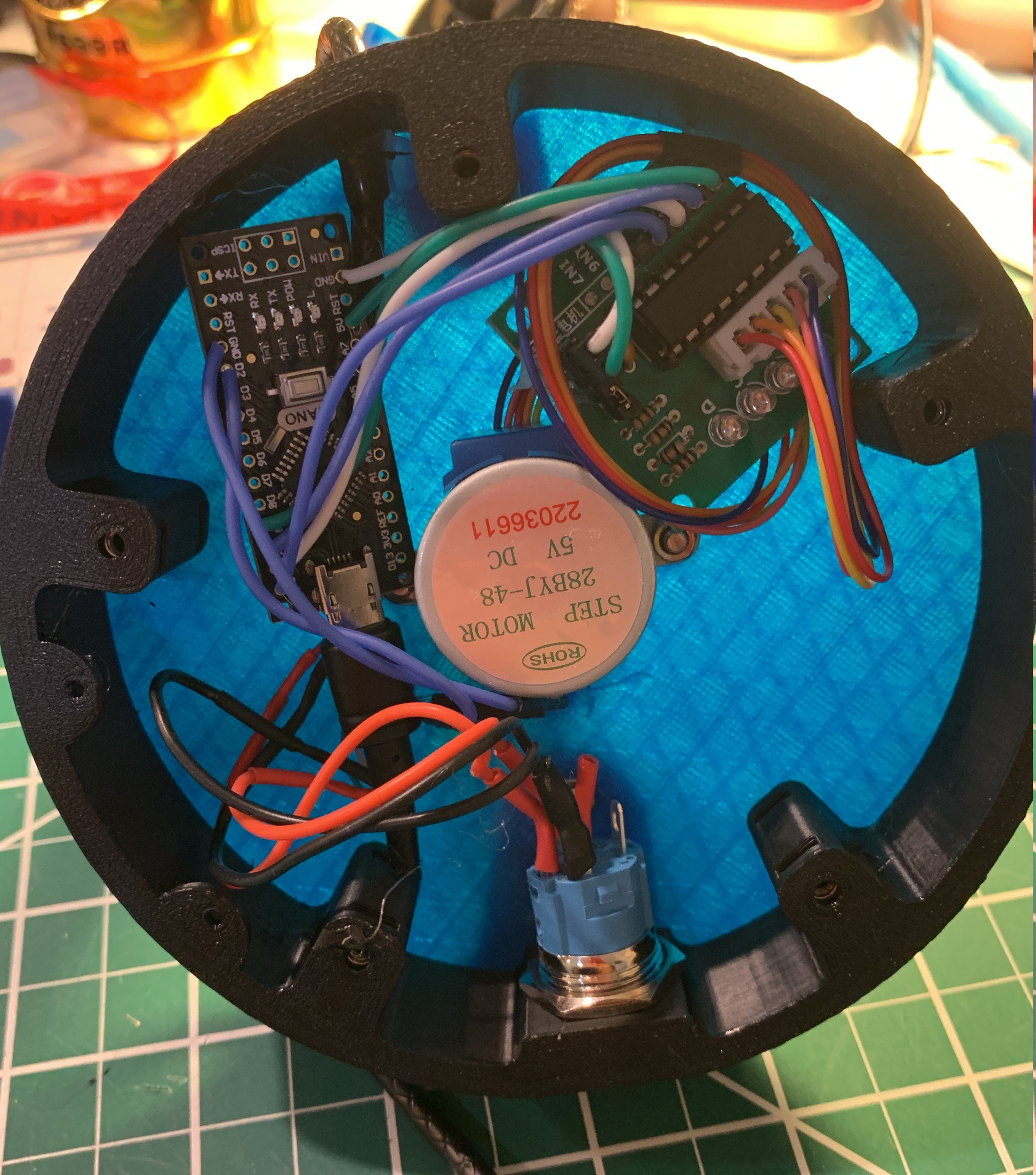
The image to the right shows lots of the parts that went into the base. The heart is an Arduino Nano. Then there’s a cheap stepper motor and driver, you can see the blue wires of the reed switch go between the button and the motor. And there’s a nifty power button that is on-off and glows blue when on. One other thing: as the blue covers were translucent, I pointed the Nano and the stepper driver downwards, so as not to shine their LEDs up through the top cover.
[BTW, the sharp-eyed might notice that I have the USB cable coming out the top of the base instead of the bottom. Yes, for some reason, I usually end up assembling things backwards or having to repeatedly disassemble for some stupid reason. Rest assured, all is good in the final version.]
All that jazz One of the great things about making is not just all the projects out there that you can download and build. The great thing is that there is always room for tweaking, re-purposing, or modifying to fit your needs. Indeed, many of my projects are exactly that – just look at some of the projects from this challenge.
The process feels like one big jazz jam session – everyone riffing off others, weaving in their own voice, making something new and surprising.
You don’t need to follow the project to the letter, nor do you have to do it all yourself. Just go out there, find something you like, build from there, and join the jam.
The Death and Deathlessness* project was my exploration of life, death, and immortality. EEPROMs, the permanent memory in some chips, have finite life for writing. I had seen examples of folks killing EEPROMs, basically repeatedly reading and writing until they encountered an error, a failure for the address in the EEPROM to correctly take a write. I therefore thought running down an EERPOM to the last failure would be the equivalent of death. And recording it for playback would be like immortality – or would that still be life?
As I was building the project, I realized there were a few questions I could not find answers for. For sure, folks had shown that ATmega or ATtiny EERPOMs actually can be faithfully read and written way more than the 100k cycles the manufacturer guarantees. But everyone stopped their experiments at first failure.
I wanted to know if when an address failed, was it the whole address or was it the whole EEPROM? It felt like it was the whole address, as I’ve heard that folks would stop using that failed address. Though, if an address failed, did it stay failed? And if it stayed failed, would other addresses also start failing until the whole EEPROM had failed? And because I was writing then immediately reading, would the fail be harder to find? That is, my failure test required failure right after a write. What if failure after 100k cycles really was related to long-term stability of the address, which I’d never see, or which is why folks could hit 1M or 2M quick read-write cycles before seeing a failure?
Well, since I was going to run this EEPROM down, I realized that I would be able to answer some of these questions.
When the whole thing started
Some parameters I was using an ATtiny45, which has 256 bytes of EEPROM. I was only using the first 128 addresses (because my readout was an LED matrix with 128 pixels). For each byte I alternated writing 240 (binary 11110000) and 15 (binary 00001111), meaning all the bits alternated each cycle. I read the value after every write to see if it retained the expected written byte.
My first try blew past 2M cycles with no errors showing, so, in disbelief, I stopped to check my code. It was good. So I got a fresh chip and started another experiment, and with extreme self-control, let the damn thing run for what felt like forever, without watching it.
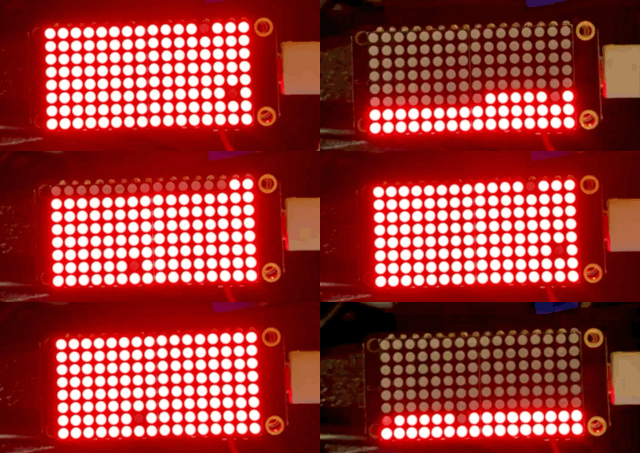
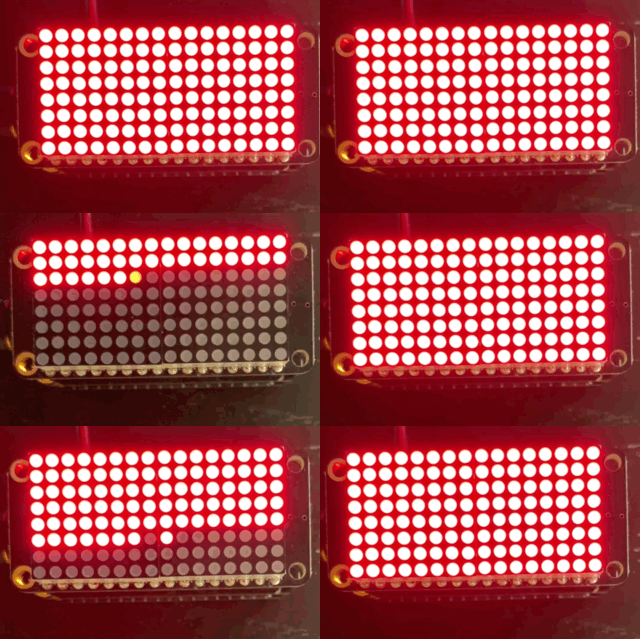
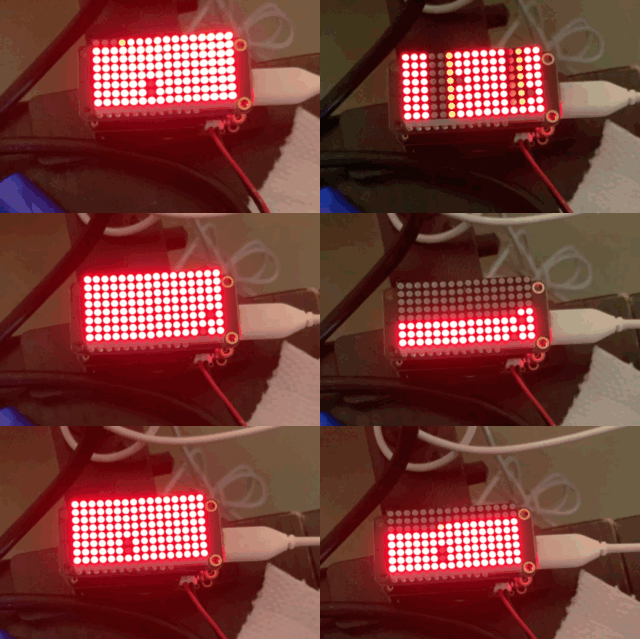
Errors! Addresses 25, 33 and 115. Image from day 28.
And then I saw an error. And some interesting behavior. After a few days, and some more interesting behavior, I stopped the experiment.
There was a challenge handling a CSV file with 4.9M rows, but I was able to see that the experiment did about 3.7M cycles, throwing about 1.2M errors.
And now for something completely different The addresses that failed would only show a failure every other cycle. That’s the first insight: failure is at the BIT level, not the BYTE level, such that when it wrote and read a number, it would fail, and when it wrote and read the next one (all different bits), it would read fine. For example, address 33 always failed on the odd cycles, while address 41 only failed on the even cycles.
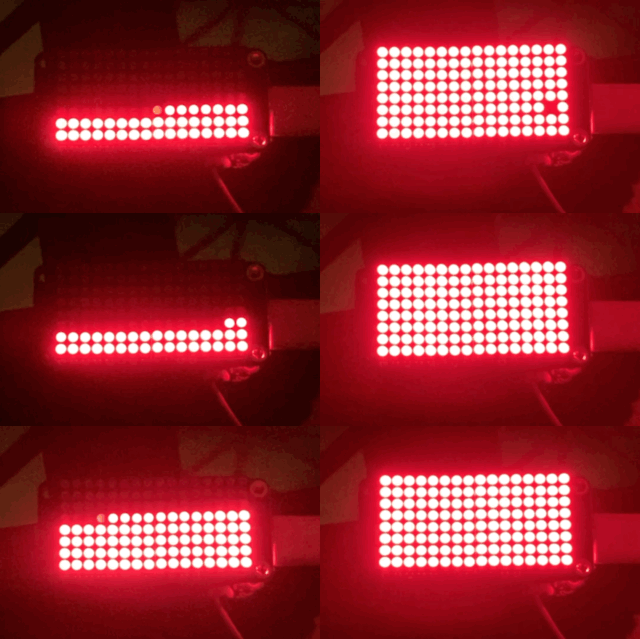
Bit-level failure (morning of day 29)
Crazier still, while a failed address would fail consistently for a long stretch, it would then NOT fail for a long stretch, too. Indeed, I saw other failed addresses, also showing the alternating of fail and succeed, pop up and then not show up for a long time. For example, 33 is first to fail at cycle 666,517; and it fails 263,318 times in the subsequent 3,004,848 cycles.
I did a histogram and saw that only 29 addresses had ever failed. Address 33 was the address with the most failures. But address 34 fails 3 times (adjacent odd cycles 3,440,911; -913; -915) and then never again (that’s for the remaining 231k cycles before I turned it off).
Long stretches no errors (evening of day 29)
This failing for stretches and then not failing suggests to me that this is a probabilistic fail rather than a catastrophic terminal fail. Think of it as the bit has an issue holding a charge (probabilistic) rather than no longer holds a charge (catastrophic fail). So it can go long stretches when its probability of holding a charge improves, until the probability gets bad again.
Of course, for the manufacturer and anyone looking to depend on the EEPROM, stepping into that probabilistic failure might as well be a terminal failure as it makes that whole address useless. As for me, who thought that perhaps the whole address would fail, or that at least when a bit failed, the address would stay failed, this probabilistic nature basically killed the nature of my project.
Yup.
I could do a bit more statistical digging into the data, but I don’t really have that skill, or the right toolset. Nonetheless, what I can figure out is that the condition where EVERY address fails is likely impossible (or way longer than I am willing to wait – tho I am tempted).
Below is a link to the CSV is you’re interested in checking this out. The columns are Cycle, Address, Result (0 for failure). For my own logging and for the LED matrix output, I wrote out a row for every cycle. But, to save space and speed things up, I only wrote out Address and Result when there was a failure.
Please note, I share the original so I can avoid inadvertently introducing something in editing. There was some writing artefact that added a null row after every error (about 1.2M – sorry). And there’s some gibberish before the first cycle you need to delete. I suppose I could revisit the logging code.
Summary I had wondered a few things about how EERPOMs fail. I wondered if when one bit failed, the whole EEPROM failed. That’s not the case. Also, I couldn’t find anything that suggested if errors were at bit or byte level. I now know that they are at the bit level. I also wasn’t sure if a failure was terminal. Turns out failures are probabilistic, so an address can function properly after having failed numerous times. Also, that means that I likely would never be able to kill off a whole EEPROM, where ALL the addresses fail on EVERY read and write cycle.
In the end, what I thought would be an achievable and straightforward running down of an EEPROM, turned into an interesting revelation of resilience for the wee chip.
You’d think everything there is to know of ATtiny or ATmega EEPROM failure is known. Well, perhaps not (or maybe I just couldn’t find the answers to my questions). In any case, my Death and Deathlessness project did teach me many interesting things about EEPROM failure.
Do these finding jive with the EEPROM behavior you’ve seen?
*Deathlessness is a key concept in the Lord of the Rings. I even wrote a short story on it in college, as extra credit, that the prof read out in class, to my embarrassment. In any case, when the movies came out, I had a chance to teach my kids how deathlessness was a key thread throughout JRRT’s stories of Middle Earth.
I recently completed the final project of my year-long challenge to make a project a month from 15jul20 to 15jul21. This marks the end of my second year of making, counted from when I had to do a project for work and resurrected a Arduino Uno I had in the closet for 10 years (I never figured it out the first time). And by making I mean chips, circuits, PCBs, 3D printing, and the like [I’ve always been creative making and designing things, but not the level of these past two years (sort of)]
Anyway, I chose the challenge as a constraint – both to hold me to making 12 projects, and to time constrain things so that things just had to get done.
Well, things were not that simple.
Life intrudes Before I list the projects I did and provide some commentary, I will admit that I did not keep to the schedule of constraining the projects from the 15th of one month to the 15th of the next. Already with the second project, timelines slipped. And then a death in the family (my father) had me skip two months – yeah, I had other things to focus on – and was subsequently affecting the amount of time I had during the rest of challenge period. Some months I would go a week or two not touching a single project.
At the same time, the projects kept me going after my father passed, and also engaged my mother (she’s a long-time maker, very creative and totally grokking what I do, providing great advice on project design – really). So while on the one hand parts of our lives were up-ended, the projects also helped us move on after the up-ending.
But none of this is any excuse. The whole part of a challenge such as this one is to provide concrete achievable goals, constraints, and urgency. Arising from that, we learn about ourselves, our materials, and our limits.
Gaming life For every project, I was trying to insert some meaning, or trying to make a concept tangible. Not sure I hit the mark each time, but the intent was there.
My first project was the Multi-mode Game of Life. This one was meant to show aspects of contagion (it was the Summer of Covid) and #BLM. As a bonus, I whipped up a Game of Life: Contagion Mode, Rose Garden Massacre Edition, inspired by the disastrous super-spreader event during the nomination of the last Supreme Court Justice.
Slowing down time Next came Seeing Thru Time, inspired by the closeness of Jupiter, Saturn, and the 4th of July full Moon last summer (the three, including a full Moon, were up again last night, tho not as close). The goal was to show how long it takes for light to go from the Sun to these celestial bodies and then back to Earth. I thought it was cool, even if most people didn’t. For me at least, this was the first one to hint at the sublime – awakening a sense of fearsome wonder for the universe.
The funny thing is that I really don’t have anywhere to put it, so this project has inspired me to rearrange my workshop for more permanent installations.
Spooky After that, I wanted to do something for Halloween, perhaps something scary that I could hang for trick-or-treaters. And being a bio-geek, I knew I wanted to do a virus.
For this project I knew I wanted to dodecahedron or icosahedron. And fed by a ton of LEDs and resistors I had lying around, I made a spiky model with animated LEDs (over 60!).
Quite fun.
Pausing And then my dad died. There was only so much attention I could give while I dealt with the aftermath, I ended up skipping the next two months of projects. Indeed, those two months were actually planned to be a two-part project around book making. The first month was supposed to be print making, the second 3D printing a book. I had just started the test prints. But really, I could tell that my mind wasn’t up to working on the projects. There’s only so much attention one has, and my mother and family definitely took precedence.
Picking up on the next measure That pause took me to mid-December, ready to start what would have been the sixth project, but was now the fourth. This one came out of a zany idea that someone with one watch knows the time, but someone with, uh, five, is never sure. The idea (“For All Time”) was to set up different timepieces and watch the times deviate.
This was an elaborate project, forced me to up my skills in Fusion 360, work with stepper motors for the first time, and fill every single pin possible in my TinyPICO. I was also pleased to see the project get called out in the Adafruit Blog (*blush*).
Alas, everything worked well except the stepper motor. That is, the holder for the stepper motor failed, so the whole winding mechanism was useless (for the bottom middle watch). And then I ran out of time to make it better.
One thing I haven’t said until now is that one of the watches was my father’s (the one with the white face), that I took off him when they took him away. So, one thing I want to do, now that the challenge is over, is go back and fix the winding mechanism and get this contraption turned on again.
Being cheeky The watch project was to show that time could seem arbitrary. Serious stuff. In contrast, the next project was all cheek.
Early this year, COVID vaccines were all the rage (not sure why they no longer are, considering). My extended family members were all getting their Fauci Ouchys. Therefore, I wanted to make a range of blinkybadges for them to proclaim their vaccinated state.
Alas, I only made one of the designs. Though I did learn heaps from the process – new chip, my own artwork, hot air gun soldering of SMT – among other things.
A quite interesting project My father was old, and in those final years I was thinking a lot about death, dying, and immortality. I was also thinking how I could express such concepts in a tangible way. What I came up with was recording the life of an EEPROM as it dies.
The project was called “Death and Deathlessness“, a saying out of the Lord of the Rings (indeed, in college, I wrote a short story on the topic). Deathlessness, rather than immortality, was a key concept in the LotR.
The project, inspired by others who would take an EEPROM to first failure, was to take every address on the EERPOM to failure, record it on the way, and the replay it. My first question was if the replaying was life, or what, if it was the exact same as the life of the EEPROM.
Truth is stranger than fiction. The damned thing ran so long before the first failure that I kept verifying if the code was right (it was). I’m not going to say more here as I did some forensics I want to share in a separate post. Interesting stuff.
Pretty pictures End of April, we were heading to graduation season. Me, in all my wisdom, decided to make something image-based for graduations in the family. I recalled lithophanes and found a really helpful website for me to create the files to use in 3D printing.
This project was really fun, the 3D printer working long hours every day. And this projects is one of the rare ones my family has asked for more. Tho, I realized when the lithophanes were done, that the graduates wouldn’t want a photo of themselves, so I gave the framed lithophanes to their mothers. Haha.
I have a few frames left over so will definitely get back to these to make more, especially to complete the one of my mom holding my dad’s hand, shown here.
Another unfinished project The next one was one I had been pondering since I first thought of the challenge: “what does Dignity look like?” And throughout the year, I was nowhere near getting that answer, until one day it clicked. Alas, in the time I had, I was able to work on the electronics and the code, but got bogged down with the enclosure, which is instrumental to delivering the experience.
I’m not going to say more here, as I will be going back to this one, as this one is important to me.
Blinkenbugs One other project that I was excited to get to, but that had to wait for the start of Summer, was around fireflies. The original project concept was some funky Boldport artsy freeform and PCB type creation that could simulate firefly flashes. But due to time, travels, and the chipocaplypse, I instead decided to use mostly what I had already.
Soon after I wrote the post on the project, I did manage to attract some fireflies. Quite thrilling. But more importantly, the project had me (and at times, other family members) out most nights, marveling at nature’s light show (that fearsome wonder of nature, again).
Tree of Life After that, I reached the final project, the Tree of Life. Not to be just some lit up image, I decided to add a twist, a twist that I hope makes one think of what dementia looks like.
Also, it just is one wicked beautiful build. Which got me thinking: the 3D model was purchased and I riffed off of it (multi-color, mounted, animated). At first I felt awkward mentioning where I got the model (folks would go ‘wow’ and I quickly let them know it wasn’t me who did the model). But then I realized that remixing things is OK, kinda like with my COVID decoration (also a purchased and modified model).
Indeed, if there’s one big thread through my past year is that so much of what I made is based on the genius of others and I’m just a humble remixer, seeing new ways to bring all those bits and bobs together into something that means something to me, and hopefully to others. While the challenge forced me to go in and out of projects quickly, it also taught me a wide range of skills that I can now go more deeply into for fuller materialized ideas.
Yeah, that kinda suggests what the next year will be like, haha.
Here is my final project of my year-long challenge. I was on target to finish it on time, but life has a way and I ended up finishing it about a week late. But fluid timelines were common to this year-long challenge. Plus, I really didn’t start this last project on time.
Clear vision As with some of my projects, I had a clear vision of the face of this project. Well, sort of. I knew I wanted a tree image and pixels for leaves going through the seasons. And part of my prep for a project, I think of a ton of things, such as, in this case, looking up tree lifecycles as reported by some service or some freeform sculpture.
If there’s one thing I learned in the past year doing these projects, though, is to mind the feature set and the time frame. I also wanted to keep in mind what I could do with minimal purchasing. An earlier project had exceeded my usual burn rate.
The tree With a clear desire for a tree, I figured I could draw something or get a SVG online to convert into a 3D model. Though, remembering my COVID model, I dug a bit deeper to see if I could find a ready-made model
Unfortunately, so many were indeed just a flat conversion of an image into something for a CNC or a 3D printer. But then I found (and bought) a really intricate model, meant for a CNC, with precisely the aesthetics I was searching for (see below). And the model maker was kind enough to convert it for 3D printing.
I printed a small version to see what it looked like and it came out nice. Though, my 87-year old maker mom took one look and suggested I print it out in two colors. Which was a great idea.
I had originally thought of poking the neopixels through the model, but when she suggested two colors, I knew it had to be something translucent. So I then did a sample print with the red translucent filament I had. To which, of course, my mother suggested I try a different color.
I picked up a baby blue translucent filament and whipped up another test print. It looked great. Just the look.
Trouble in model-land My next move was to modify the print. Initially, I was thinking of poking the neopixels through, but with the translucent part of the print, decided to modify it so that I could mount it on something.
Turns out this model was way complex and Fusion 360 (or at least the copy I had) was choking on it and requiring that I lower its resolution. I spent a few hours wrangling with it, but no luck. So I had to change my tactics – I decided to make a ring that I’d then glue to the model and then screw that to the backing that would hold all the electronics.
Getting on with the printing After printing some test prints to make sure I was making the backing properly, I printed up all the parts – the ring, the backing, and the tree.
The full-size tree print was about 16 hours, including the filament change after the first few clear layers.
Came out so nice.
For the backing and ring, I made a simple model in Tinkercad (where I prefer to make my simple models).
The idea was to solder a string of neopixels and glue them and the microcontroller to the backing. But I had specific places to put the pixels, so I printed a paper copy of the tree, marked where I wanted the pixels, flipped it over, put down some two-sided tape, measured the wiring, and soldered the neopixels together stuck to the places I had marked. [If you wonder why flipped over, it’s because I had to solder the back of the pixels.]
To then transfer the neopixels to the backing, I then flipped it all over and put it in the backing, slowly gluing the pixels and removing the paper and tape.
The cutest microcontroller The brains of the operation is an Adafruit QtPy, chosen for its size, simplicity, and that I really only needed two pins. Also, because I intended to run this off of the USB jack, didn’t really need much more (the neopixels are powered from the GND and 5V pads underneath the QtPy – giving 5V directly from the USB).
Of course, the other special reason is that the QtPy runs CircuitPython, with which I prefer to code my projects. This also helped in the prototyping of the build.
For prototyping, I used a Circuit Playground Express, also from Adafruit. The CPX has 10 neopixels, so I could prototype much of the code – setting up the pixels, the animation, the logic behind it (I’ll get to that). And then all I had to do was copy the code over to the QtPy when everything was hooked up.
About that code The neopixels at the top are the leaves and the ones at the bottom are the roots lights. For the root lights, I just wanted some white twinkly thing. But for the leaves, I wanted them twinkling the seasons – yellow and white for flowers in the Spring, green twinkling in the Summer, orange and red twinkling in the Autumn, and then off in the Winter (see Summer to Autumn change in GIF above).
That was the easy part. But usually I like to insert something special in the projects I did during this challenge year, give them a wee more meaning. And for this one, I did: dementia.
When leaves forget This past year I’ve had to spend some time caring for a family member who has dementia, and watch a friend grapple with it in her family. Dementia is a cruel disease, robbing brilliant folks of their memory, their understanding, their awareness. As with other events in my life in the past year, dementia has captured my thoughts of how I could express it in hardware.
Therefore, in my Tree of Life, as the leaves go through the seasons, there is a chance that they forget themselves – they either start wandering the seasons in the opposite direction (say, go from Summer to Spring) or change the length of their season (say, slowing down or speeding up).
The idea is that we would begin to see a single leaf get out of sync with the others. Eventually, all the leaves will fall out of sync as the whole tree gets dementia.
Indeed, testing the progression, indeed the whole set up gets out of sync. I’ve since tweaked the code to slow everything down and be more subtle with the dementia. I have no idea how long things will take, but that’s OK. I’m happy with how it turned out and it’s now hanging in my work space.
Build complete Also, I’m happy that this was the last one I did. These monthly projects really consumed me whether working on them or not. And the past year was quite eventful for me that there was the added challenge of life (and death) getting in the way. I look forward to non-time-constrained projects. Though, I’ve pondered what my goals for the next year should be. Haha.
In any case, I owe you all a write up summarizing the year, another looking forward to my next year of making (those goals), and I really want to share news from this project that has now run a long time and yielded some interesting insights.
My latest challenge project was selected already last year when I set the challenge. As this had to do with fireflies, I knew I had to have it ready for early June, when they’d be all over the place, doing the flashing they’ve been doing for millions of years.
Needless to say, I’ve been waiting to do this for a long time.
Though, by the time I finally got to this project, I had wizened up in terms of what I can do in the one month I had, including all the logistical constraints due to some things going on in my life.
I had originally wanted to make a fancy PCB, inspired by Boldport bugs (tho with no expectation of being anywhere as brilliant haha). But I realized that I didn’t really have the unbroken time to do a design. And then there’s the crazy chipocalypse of parts shortages and price hikes. Also, a comment on being thoughtful when making physical devices, made me, well, be thoughtful regarding this project. And, lastly, a recent project spiked my component buying burn rate, so I’ve been trying to do my projects with as many components from my stash as possible (c’mon, constraints can be liberating for creativity).
With all that, I decided to build this with what I had on hand. I did eventually buy some parts: a super capacitor and a solar panel, tho they were well below my usual project budget (in other words, helped get my average monthly expenditure down).
The build Since this is the ultimate blinky project, the key component is an LED (green). I wasn’t sure what the local blink pattern would be, so I programmed a trusty ATtiny45 (undervalued in an world of ATtiny85 snobbery) with multiple blink patterns (see image right), and connected a momentary button to switch between blink patterns (state remembered between power-downs via EEPROM).
For power, I realized that I didn’t want to use a CR2032, so I hopped on Amazon and purchased a 5V solar panel and some super capacitors.
An aside on buying components on Amazon Normally, I try to support my favorite vendors or smaller vendors I encounter – anything to avoid Amazon. Not only that, when I go to other vendors, I buy the number of components I need. Usually, when buying at Amazon, even when the per part price is cheaper, you end up getting more of them than you need. I can’t count the number of times I got a ton of extra LEDs, LDRs, header pins, resistors I didn’t want, but that were shoved into the purchase.*
So, to get one solar panel and two caps, I got eight more caps, and nine more panels. Ok, I partly thought I’d be making a few copies, but stopped at one. Now I have even more extra components around.
Back to the build – many firsts I had been wanting to make a project with solar panels and super capacitors for the longest time. As the project would be out on multiple nights, I figured it was perfect for a solar panel to charge some caps, which would then discharge during the night, to be recharged in the morning.
I had a Schottky diode to make sure the solar panels wouldn’t suck charge from the cap at night. I could not find a 5V-ish super cap, nor a super cap with significant charge (F). To get the voltage up, I put two 2.7V/3.3F super caps in series, which gave me 5.4V but 1.65F (that’s how it works out). The voltage of the super caps in series was actually what I needed, as you charge them 10-20% below their total V (or that’s what I read). I could put two pairs in parallel to get back up to 3.3F, but 1.65F was more than enough.
As I kinda wanted this to be off by day and blink by night, I wanted to make a light sensing circuit. To do this I used a CdS light detecting resistor and a PNP MOSFET as a high-side switch to power or not the ATtiny. I had just built a high-side MOSFET- and LDR-driven switch that also had an NPN transistor (off when dark), inspired by having to do the high-side switch for this build. Doing these high-side transistor switches was a first for me.
Another first for me, I didn’t program the blinks with the usual delay() nor with millis(), both which would keep the chip powered on. I wanted to stretch the power by sleeping the ATtiny as much as possible. I found a good article that set me on my way to using the watchdog timer to sleep the chip during the pauses in the blink. Also, the button press to select blink patterns was also an interrupt, so the sleep intervals were not holding the chip hostage, as using the delay() would have. In the end these techniques economize power (or so I think) by spending more time asleep than on.
That completes the circuit. I threw in a 0.1µF cap on the ATtiny. Because. And mounted the ATtiny in a DIP socket, so that I could pull it out to program.
Origami-ish I sure wish I knew how to lay out a circuit for a protoboard in KiCAD. I’ve seen lots of hacks, but I’m surprised there isn’t any KiCAD plug-in for this.
In any case, I dove into the origami of twisting and connecting the components on the protoboard. Nerve-racking, but actually a fun chestnut to crack (a multi-meter helps).
There were some connections I bridged with lacquered winding wire (I so like using it for bodges, once I got the hang of it).
You can image how pleased I was when this assembly worked on the first try.
In the field The whole point of the project was to put it out at night and attract fireflies.
The first night I finally saw fireflies, the blink pattern was NOT any of the ones I had. I had to then program the flash I saw (three quick pulses) and then put the contraption back out in the night.
OK, so it charged well by day. Blinked when the night came. But I think these particular fireflies prefer to be up in the trees, which is where they all were. I’m used to fireflies that hang out in the grass. So I suspect the hot-to-trot fireflies in the treetops were looking down and wondering why there was one in the wrong place missing all the action. Haha.
Alas, I really didn’t have luck attracting them. Though last night there were a few fireflies that came down near my contraption, flying around or down on the grass below the deck banister I had the contraption on.
Nonetheless, this was a fun build. Got me out at night to marvel at the fireflies and their biology.** And learn a few new things about electronics (especially that I need to learn the math around transistors).
Oh, and I happened to complete this challenge project on time!
*Well, extra LEDs actually led to this crazy thing **In high school we actually did the chemical reaction for the bioluminescence – what a nerd!
This past year, I’ve challenged myself to do one meaningful project a month. While building embedded electronics and printing objects can be fun, I wanted to keep myself to a few constraints, such as each project needs to be around making a concept tangible, or that concepts should use microcontrollers (if using electronics) rather than more capable computers. OK, so I might not have cleaved to those constraints, but they were a good start.
In any case, I’ve done OK. I started to challenge on 15jul20 and because I mark the month from 15th to 15th (there’s a reason) on 15jun21 I’m about to start the last project of the challenge.
At the end of this last project, I’ll post a summary post with links to all the projects, and some commentary on what I’ve learned along the way.
In the mean time, I realized I have not posted the last two projects, not to mention an update on one that has been running for a while. Fear not, they will be coming. Watch this space.
This month*, with impending graduations of some family members, I wanted to do something that I could give as a gift. I knew I wanted it to be an image, and, with some recent successes of mine with PCB art, I was considering doing some sort of PCB image gift thing. Alas, I really wasn’t motivated to do it, so had to consider something else.
A while back I had seen 3D-printed lithophanes. The whole process, though, seemed quite convoluted and specialized that, at the time, I was turned off. Nonetheless, this time around, I did a wee look again to see what was out there and found this incredibly simple and useful site, 3dp.rocks.
In no time, I had uploaded a pic, futzed with the settings, and downloaded a model. Then, into the workflow to get it printing.
What’s a lithophane? Lithophanes originated in the 19th century France and were all the rage. Porcelain was etched from behind in a way that light shining through showed an image. Thicker parts were darker and thinner parts lighter. Likewise, one can print something with varying thicknesses and when held to light it makes an image.
Little things Of course, I soon realized that there was more than just converting an image. Since I was shining light from the top of the print to the bottom, which was flat and featureless, I needed to flip the image. Also, I had to make sure I was chasing the right polarity (negative or positive) and had 100% infill (otherwise the fill pattern shows). Yeah, I made all these mistakes.
Framed I had fun making different prints of different sizes (see one to right). Pretty cool to hold up a flat piece of plastic and then see an image show up when backlit.
But a flat piece of plastic isn’t the end goal. I needed to frame it. And I was scratching my head how to do it. I was already looking at LED strips. When looking for frame ideas, I ran into this old video by David Watts. David was using some Ikea frames that folks use for mixing pictures and items, so it has a deep frame. Plus, one could put the image to the back of the deep frame or, yes, to the front. And when put to the front, there’s a big space behind the image. And, yes, in that space, you can put LEDs.
Inspired by the video, I bought some strip LEDs, power supplies, and some switches (and did a fun, 2 hours round-trip drive down to Ikea to pick up the frames – too impatient to have them shipped). I then laid the LEDs (cutting and wiring a few strips together), connected them to the switch and power supply, and voilá a back-lit 3D-printed lithophane.
Simple and fun This was a simple and fun project. Well, simple concept. There was lots of tweaking and multiple iterations of the images and printouts. I even played with colorizing them (see image to right, color really made the image pop out). And the larger prints (I have a large rectangular frame and a smaller square frame), at the limits of my print bed, took at least 12 hours, so my printer was going all day long for many days in a row as I iterated (also known as ‘making mistakes’ or ‘being unsatisfied easily’).
I had set out to make two, but the frames were so cheap, I will be making six – three big and three less big (wouldn’t say the smaller frame is small). So that’s gifts for everyone (tho I need some more switches and chargers, haha).
*Actually, due to some eccentricity of mine, my year-long challenge projects are from the 15th to 15th of the month, not the whole calendar month. This one ended on time. And BTW, I have only three more months to go to complete the challenge year. Wow.
In my year-long challenge, I’ve been thinking of ways to make the intangible tangible. For example, what does contagion look like, or Black Lives Matter, or dignity, or death and immortality?
I’ve been thinking of death and immortality for a long time – what does it mean to die, in what ways are we immortal, how do we add meaning to this reality, what is our legacy?
Read infinitely, write finitely The EEPROM memory of an ATtiny45 (my fave) has 256 addressable bytes. The EEPROM, for those who don’t know, is a place to store a byte that is retained after the chip turns off – so, say, you can store a value of something, put the chip to sleep, and then read the value when the chip wakes up.
But such power comes with a catch (as with all superpowers). While you can read from the EEPROM multiple times, there is a limit to how many times you can write to one of the 256 bytes. The manufacturer of the ATtiny45 says 100,000 times. Though there are reports that show the registers can actually write 1-2 million times (10-20x more than what the manufacturer says).
Of note, all the experiments I’ve seen seem to have stopped at the first failure of the chip. They were one-way, brute force read/write cycles until the first failure.
Lifelogging I realized that killing an ATtiny45 EEPROM would be a way to explore death. Though I added a twist. I was going to observe it and record it and thus explore immortality, too.
On the right is a stack I built to put this in an easy set up.
The bottom is a FeatherWing Proto with a DIP-8 socket for the ATtiny45 (yes, I want to do this a few times). The ATtiny45 is programmed to write a value to the EEPROM and then read the EEPROM, verifying the write*. The chip then sends the cycle, address, and pass/fail for every read over a serial connection to the main board.
For the main board, I currently have an Adafruit Feather M0 Adalogger (in the middle of the stack). The Adalogger will simply receive all the values the chip sends, plotting it on the 8×16 LED Matrix Featherwing (with a display clear at the start of each cycle), and logging the data to its SD card.
To simplify things, the chip does the failure testing. And I’ve decided to only read half the EEPROM (128 addresses) to match the 128 pixels on the matrix. Though, the Adalogger is only logging bad reads from the chip (or, if no failures, just the cycle – I still want to count the cycles). Logging only bad reads saves heaps of storage space.
Design choices I know there are a zillion more efficient ways to do this. But this is the path I took. I had other design choices in mind: wanted to use CircuitPython (ended up using Arduino), wanted to use the main board to program the ATtiny right in the stack (not a separate programmer), wanted to be way more efficient where the computation happens (on the main board rather than the wee chip), wanted to use a faster (serial communication, chip speed, and storage writing) FeatherS2. Alas, I ran out of time and patience and ended up where I am (and that’s part of the reason of time-restricting these projects).
Where things are at I hooked up the stack (added a battery for power continuity) and it’s been running a day or two (that’s the GIF above). I’m not so concerned about stopping and restarting, as the log files are numbered and I could stitch them together later.
I calculated how long to hit 100k cycles (about 20hrs – which has long passed) and 1M (8 days). While it seems from previous reports that I should only see something after 8 days, I want to answer a questions that I’ve never seen answered: if a write fails might it work on a subsequent read, or is the whole EEPROM dead, or just that address?
What I should see in my display (and data) is that an address will go dark – either to stay dark (single address fails once and always will fail) or will return (single address fails, but not always – still not usable, but not totally lost) or stops the whole process (when one address fails, all will fail).
Immortality One other aspect I have yet to explore (as I haven’t killed a chip yet) is playing back the whole life of the chip. That is, when I’ve logged all the cycles until ALL the registers have failed, I can play back the chip’s life, indeed, its own particular life trajectory.
Question: when I play back the entirety of the chip’s life, is it dead and playback is just a memory, or is it the real thing? If I can play its life over and over again, is that immortality or just good record keeping? And what does that mean for our lives, our recorded selves, our digital contrails?
Dunno.
*Nerdy note: I actually used complementary values per read/write cycle to alternately flip all the bits of the byte – 240 (binary 11110000) and 15 (binary 00001111).